
Of course we cannot always share details about our work with customers, but nevertheless it is nice to show our technical achievements and share some of our implemented solutions.
We are continuously improving our Customer Panel to give our customers more control over their managed servers and services. The latest added feature is DKIM mail signing, which allows customers to generate DKIM keys for their domains directly in the Customer Panel.
Note: The DKIM feature is available to customers of managed webservers or mailservers.
DKIM (DomainKeys Identified Mail) is an important component of modern e-mail authentication. To make it easier for our customers to enable DKIM, we have integrated the key generation process directly into the Customer Panel.
Creating a DKIM key is straightforward and does not require technical knowledge:
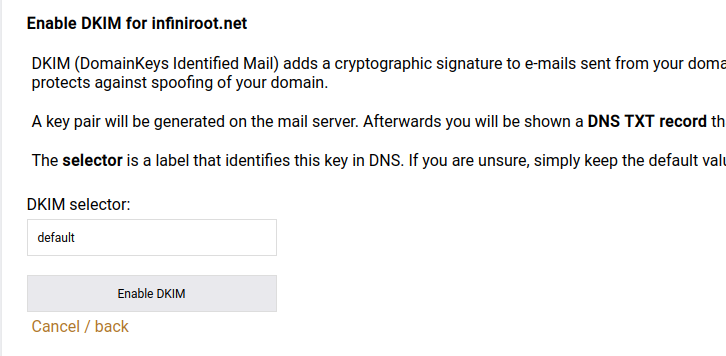
Once the Customer Panel generates the key pair, it then displays the DNS record that needs to be published for your domain.
The DNS record contains the public key required by receiving mail servers to verify the digital signatures of your outgoing e-mails.
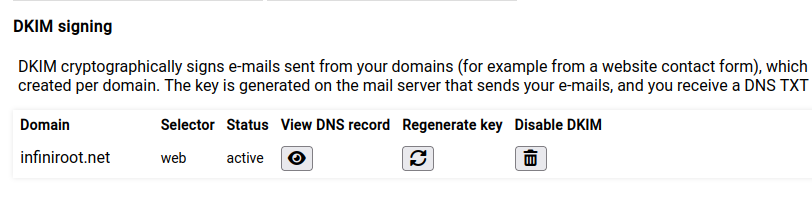
Once the DNS record has been added and propagated, DKIM verification can be performed by receiving mail servers.
The functionality is available for both webserver and mailserver customers. This is particularly useful for websites and applications that send e-mails directly from the webserver, as well as for customers using their own dedicated mailserver.
DKIM stands for DomainKeys Identified Mail. It is an e-mail authentication mechanism that allows the receiving mail server to verify that an e-mail was digitally signed by an authorized system associated with the sending domain.
When an e-mail is sent from a DKIM-enabled server, the mail server adds a cryptographic signature to the e-mail header. This signature is generated using a private key stored on the sending server.
The corresponding public key is published as a DNS TXT record under the sending domain. The receiving mail server can retrieve this public key and use it to verify the signature.
This verification provides two important benefits:
If the signature is valid, the receiving mail server has an additional indication that the message is legitimate and associated with the claimed sending domain.
Big and widely used e-mail providers such as Google, Microsoft and Yahoo increasingly rely on authentication mechanisms to distinguish legitimate e-mails from spam, phishing attempts and other unwanted messages.
DKIM is one of the important mechanisms used for this purpose. A valid DKIM signature helps receiving mail servers establish trust in the origin and integrity of an e-mail.

Without DKIM, messages may still be delivered successfully, but the receiving mail server has one less authentication mechanism available when evaluating the message.
Enabling DKIM therefore helps improve e-mail trustworthiness and can positively influence deliverability. It is particularly important for business communication, transactional e-mails, newsletters and automated messages sent by websites and applications.
DKIM is not the only e-mail authentication mechanism. For a properly configured sending domain, we recommend using all three established mechanisms:
These mechanisms complement each other. Together, they provide a much stronger foundation for e-mail authentication and help protect your domain against e-mail spoofing.
With DKIM key generation now integrated into our Customer Panel, enabling DKIM is easier than ever. Customers can generate their own keys and retrieve the required DNS records without having to contact our support team.
As always, we continue to extend the Customer Panel with features that give our customers more independence while maintaining the security and reliability of their managed servers and infrastructures.